 Private Chat
Download Private Chat
Free for 30 days on every device. Pick yours, then follow the steps below it.
Android
- Version
- v00
- Works on
- Android 7.0 or newer
- File
- PrivateChat-Android-v00.apk
- Size
- 390 KB
SHA-256: 6295c6ebff2f19588a36d82bea1b6caed2520eaee0d38f0332954884c5e9e6de
Windows
- Version
- v00
- Works on
- Windows 10 or 11, 64-bit
- File
- PrivateChat-Windows-v00.zip
- Size
- 5.8 MB
SHA-256: cbef115e15f80123a60ba47a1d1a51c8403ec66b5e513164d2493f7a013dcd6e
Install on Android
- On your phone, tap Download for Android above. If Chrome asks whether to keep the file, tap Download anyway.
- Open the downloaded file from the notification or from the Files app.
- If you see Install blocked, tap Settings, turn on Allow from this source, then press Back. You only do this once.
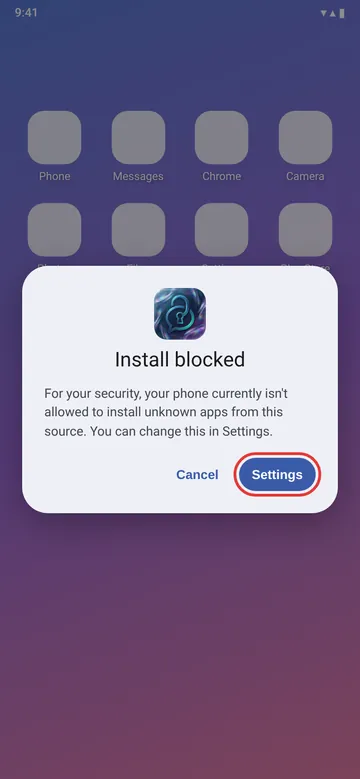
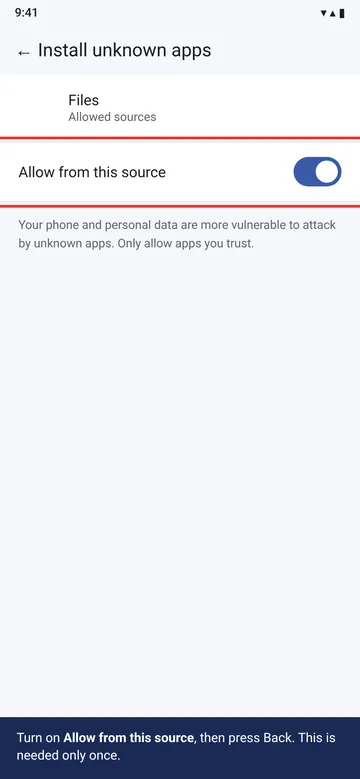
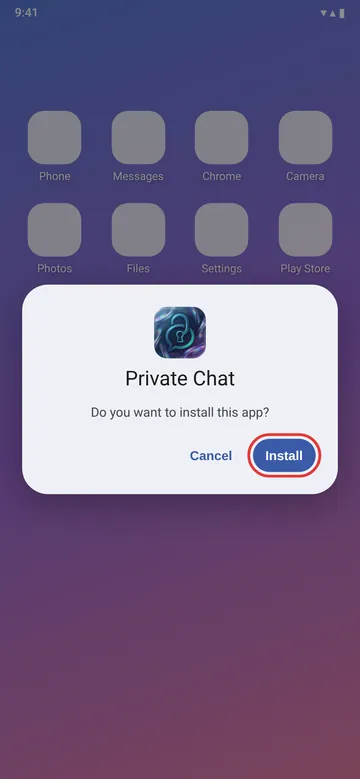
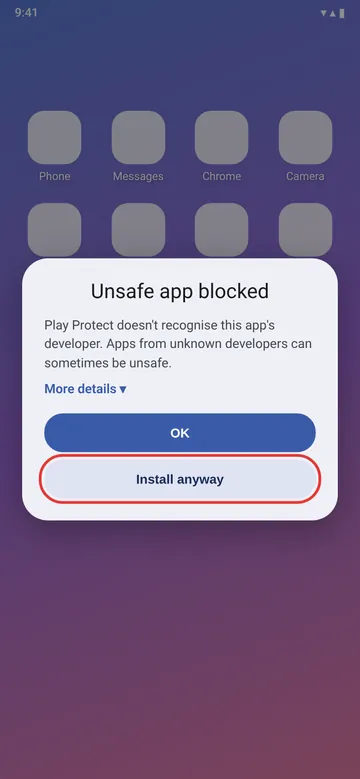
- Tap Install. If Play Protect says it doesn't recognise the developer, tap More details, then Install anyway.
- Open Private Chat, type your name, and allow the background service, notifications and battery setting when it asks. That's what lets messages and calls reach you.
Updating
Download the new file from this page and install it over the old one. Your chats and your license stay.
Phones that stop apps in the background
Xiaomi, Oppo, Vivo, Samsung and Huawei phones may also need Autostart turned on. In Private Chat, open Settings and run Background check; it tells you exactly what to change.
Is the file genuine?
You can compare the file's SHA-256 checksum with the one printed above using any checksum app.
Install on Windows
- Click Download for Windows above. If your browser warns that the file isn't commonly downloaded, choose Keep.
- Make a folder you'll keep, for example C:\PrivateChat.
- Right-click the downloaded ZIP, choose Extract All, and extract it into that folder.
- Open the folder and double-click PrivateChat.exe. If a blue Windows protected your PC window appears, click More info, then Run anyway.
- Answer Yes to "Set up Private Chat on this computer?". It adds shortcuts and starts with Windows, so messages reach you.
If Windows Security removes it
New apps without a paid publisher certificate are sometimes flagged by mistake. Open Windows Security, then Virus & threat protection, Manage settings, Exclusions, Add an exclusion, Folder, and choose your PrivateChat folder. Then extract the ZIP again.
Updating
Start the new PrivateChat.exe. It closes the old version, takes over the shortcuts and keeps your chats and license.
Is the file genuine?
In PowerShell, run Get-FileHash .\PrivateChat-Windows-v00.zip and compare it with the SHA-256 printed above.
After you install
Your 30 free days start on the first launch. When you're ready to keep it, buy a lifetime license for that device.
For every button and screen explained with pictures, read the complete guide for Android and computer (PDF, 12.1 MB).